



Pressure switch setting
How to adjust the pressure setting
The pressure switch of the domestic waterworks has a factory setting that must be adjusted to the pump capacity and your requirements when installing the pump on site.
+ Increase pressure - turn clockwise
- Reduce pressure - turn counter-clockwise
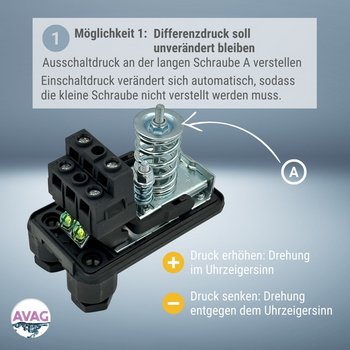
1. Differential pressure should remain unchanged
Adjust the stop pressure on the long screw (A).
- The switch-on pressure changes automatically, so there is no need to adjust the small screw.
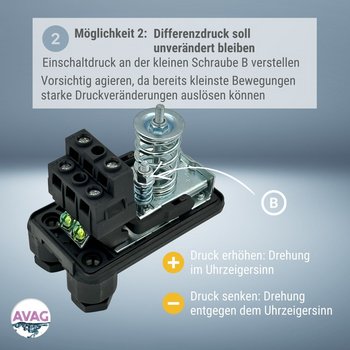
2. Differential pressure needs to be adjusted
- Adjust the switch-on pressure using the small screw (B).
- Caution: Proceed with care, as even the slightest movements can cause significant changes in pressure.
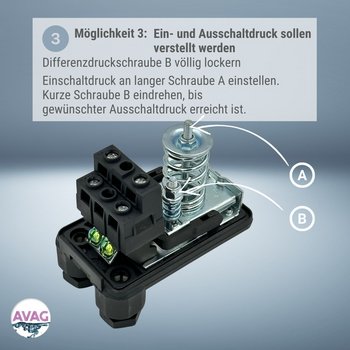
3. Switch-on and switch-off pressure should be adjusted
- Completely loosen the differential screw (B) to adjust.
- Adjust switch-on pressure on long screw (A)
- Then screw in the short screw (B) until the desired stop pressure is reached.
Adjustable pressure range pressure switch
Pressure switch PM/PT 5:
Adjustable pressure: 1 – 5 bar
Adjustable pressure difference: 0,6 – 2,3 bar
Pressure switch PM/PT 12:
Adjustable pressure: 3 – 12 bar
Adjustable pressure difference: 1,5 – 5,0 bar
Recommended pump settings:
| ACM 100 - INOX ACM 100 | CAM 100 - INOX 100 | |
|---|---|---|
| Stop pressure | 3,0 - 4,0 bar | 3,0 - 4,0 bar |
| Switch-on pressure | 2,0 - 3,0 bar | 2,0 - 3,0 bar |
| MPX - MPA | CAB - CAM 200/300 | |
|---|---|---|
| Stop pressure | 3,0 – 4,5 bar | 4,5 – 5,5 bar |
| Switch-on pressure | 2,5 - 3,5 bar | 3,7 - 4,0 bar |